As a business owner, getting a new buyer often costs more than selling again to a customer you already have. Loyalty Points on Bumpa give customers points when they buy, so they come back to use those points in your store. In this article, learn how to create, activate, and manage a loyalty program.
How a seller uses it
Tola's Closet, a fashion boutique in Yaba, Lagos. Tola posts on her WhatsApp Status that every order this month earns points. When salary drops on payday Friday, her customers come back to use their points on their next dress instead of buying from a market stall.
Before you start:
- Plans: Basic Loyalty Points are on all plans. Advanced Settings (renaming your points, unused points reminders, and points expiry) are on Pro and above.
- Only fully paid orders earn points. Unpaid or partially paid orders don't earn anything until they are fully paid.
- Reminders use Bumpa credits: 4 credits for each email and 8 credits for each SMS. Top up your credits before you switch reminders on.
1. Create your Loyalty Program
A loyalty program sets how much a customer must spend to earn one point and what each point is worth. You can run a program for website orders and a program for non-website orders.
To create your program, follow these steps:
Go to app.getbumpa.com and log in to your Bumpa dashboard.
Click on Loyalty Program (New) in the left menu, then click Points.
The Loyalty Points page opens. If you have never set up a program, click Create Loyalty Program.
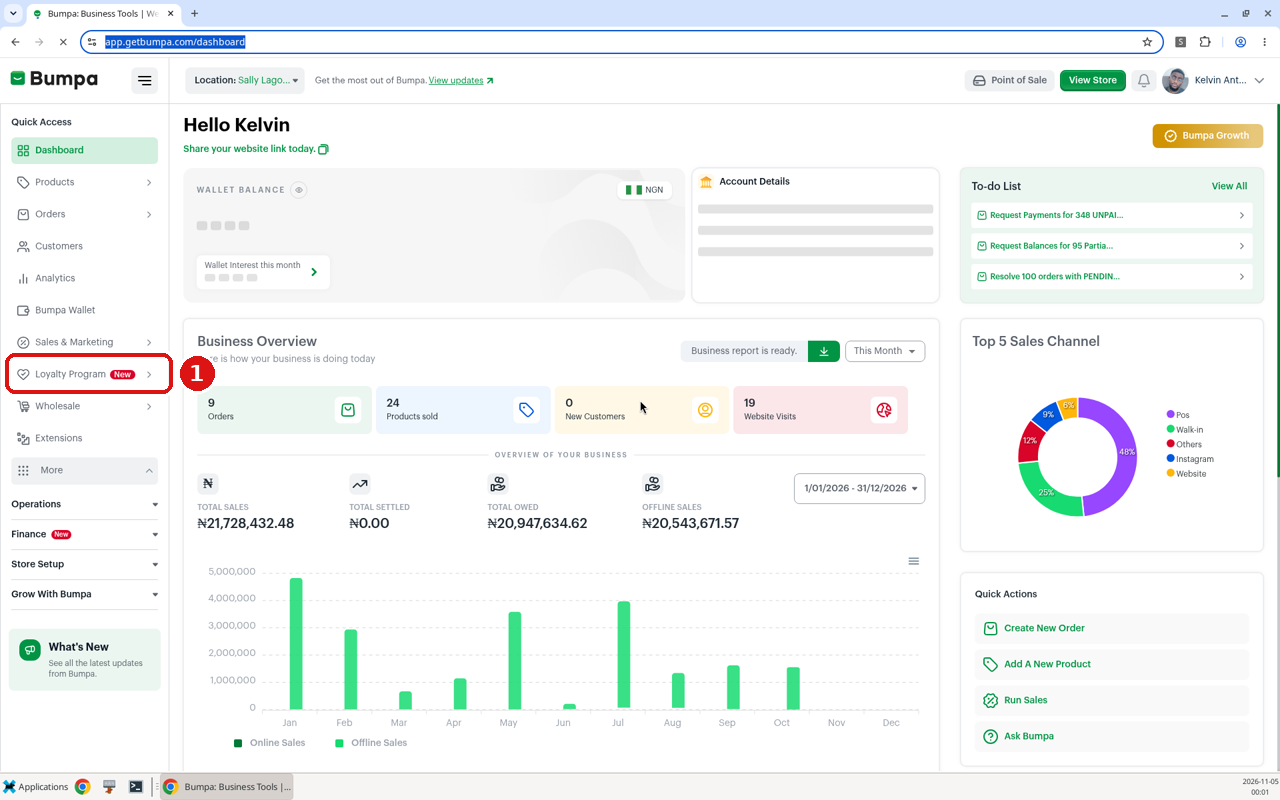
① Click Loyalty Program (New) in the left menu
Then fill in the form:
Choose a loyalty points channel. Pick Website orders (points on orders placed on your Bumpa website) or Non-website orders (points on sales you record yourself, for example, walk-in, WhatsApp, or Instagram sales). Reviews show Coming Soon.
Required Order Amount For Customer To Get 1 Point: type how much a customer must spend to earn one point, for example, every ₦1,000 = 1 point.
What's the Worth of One Point?: type how much one point is worth when your customer uses it, for example, 1 point = ₦50. This value is the same for all your programs.
Do you want to set a limit to the number of points that can be earned in a single order?: choose No, or choose Yes, set a limit and type the most points a customer can earn on one order.
Check the green preview box under the fields. It shows what a customer would earn, for example, "Based on this setup, if a customer spends ₦10,000, they will earn 5 points worth ₦250…".
You can run a program on each channel, but each channel can only have one active program.
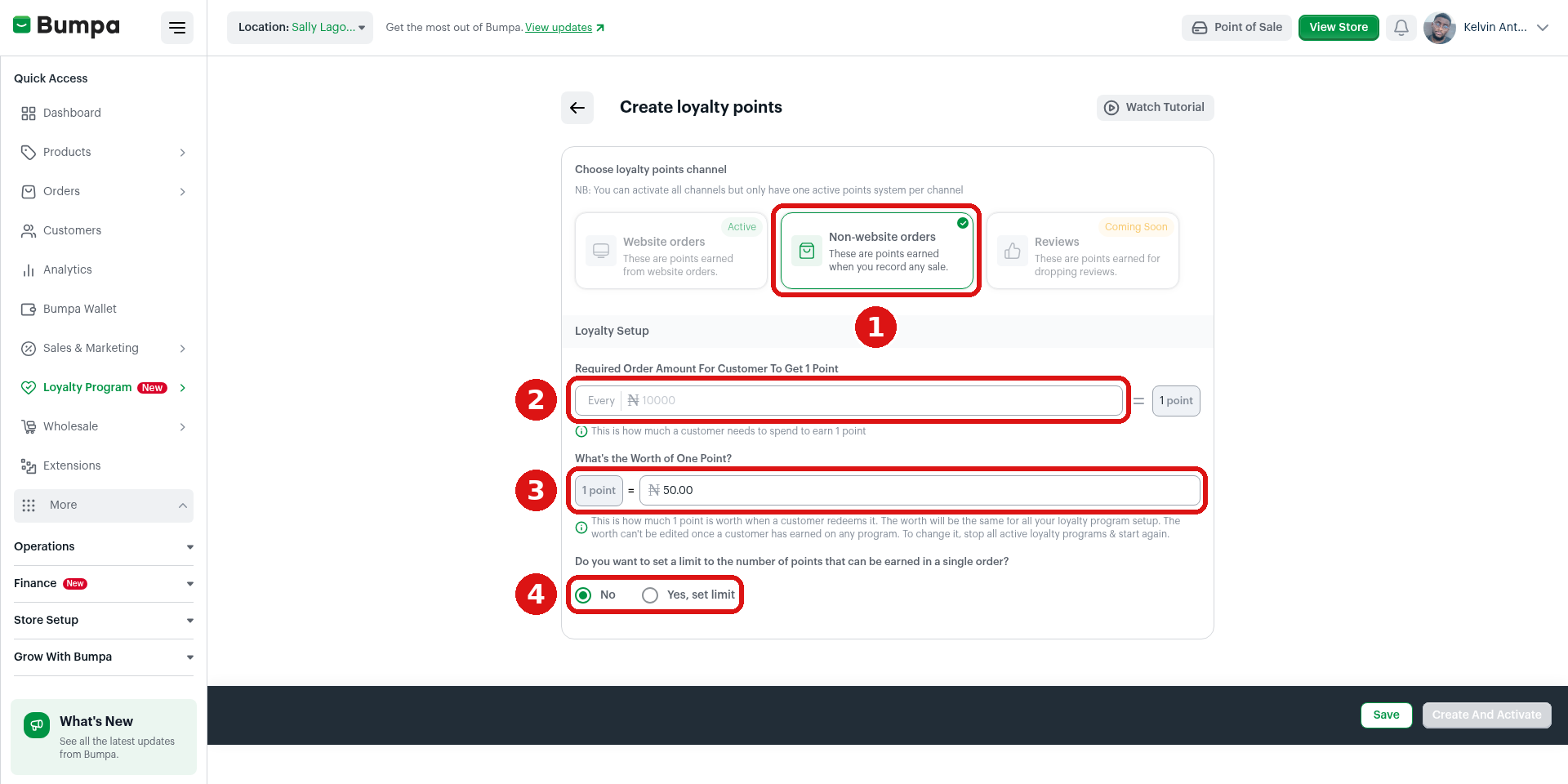
① Choose a channel · ② Required Order Amount For Customer To Get 1 Point · ③ What’s the Worth of One Point? · ④ Set a per-order limit (No / Yes, set limit).
How to pick your numbers
Divide the worth of one point by the amount a customer spends to earn it. That gives you the share of each sale you give back.
Every ₦1,000 = 1 point, and 1 point = ₦50. That is 5% back. A customer who spends ₦20,000 earns 20 points, which is ₦1,000 off their next order.
Every ₦2,000 = 1 point, and 1 point = ₦50. That is 2.5% back. A ₦5,500 order earns 2 points, worth ₦100.
Add a limit to protect yourself on big orders. With 1 point = ₦50 and a limit of 100 points, the most one order can earn is ₦5,000 in rewards.
2. Activate Your Program
Clicking Save only keeps a draft. Your customers start earning points only after you activate the program, so check that its status says Active.
To activate your program, follow these steps:
At the bottom right of the form, click Create and Activate to switch the program on now. Click Save only if you want to come back to it later.
If you clicked Save, go to the Loyalty Points page and click Show all details on your program. You can still click Edit Program or Delete Program at this stage. Click Activate Points to go live.
A box asks you to confirm. Click Activate Programme. Customers start earning straight away.
Once customers start earning points, you can't adjust the program. You can only stop it and create a new one.
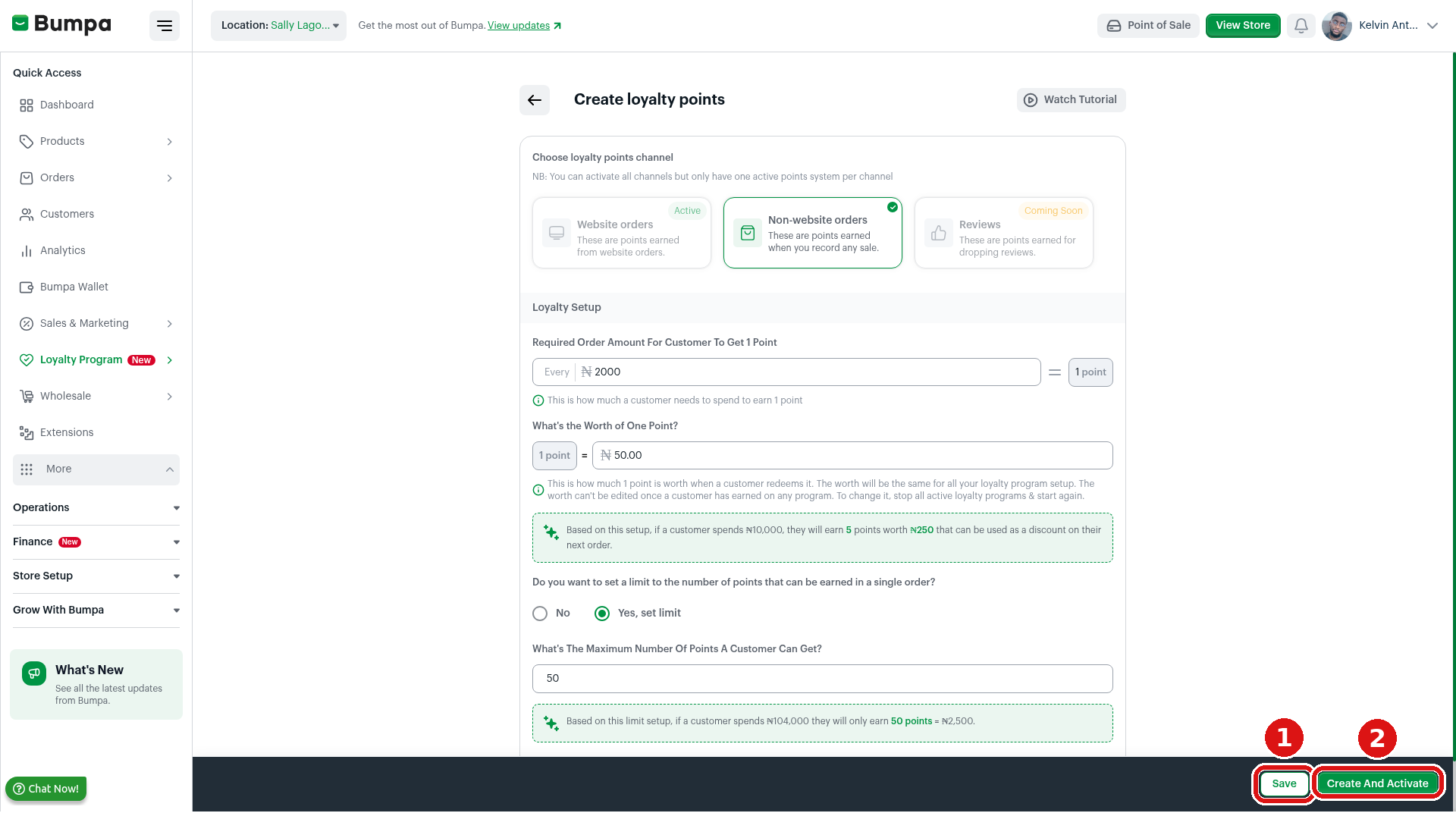
① Save keeps a draft only · ② Create And Activate switches the program on.
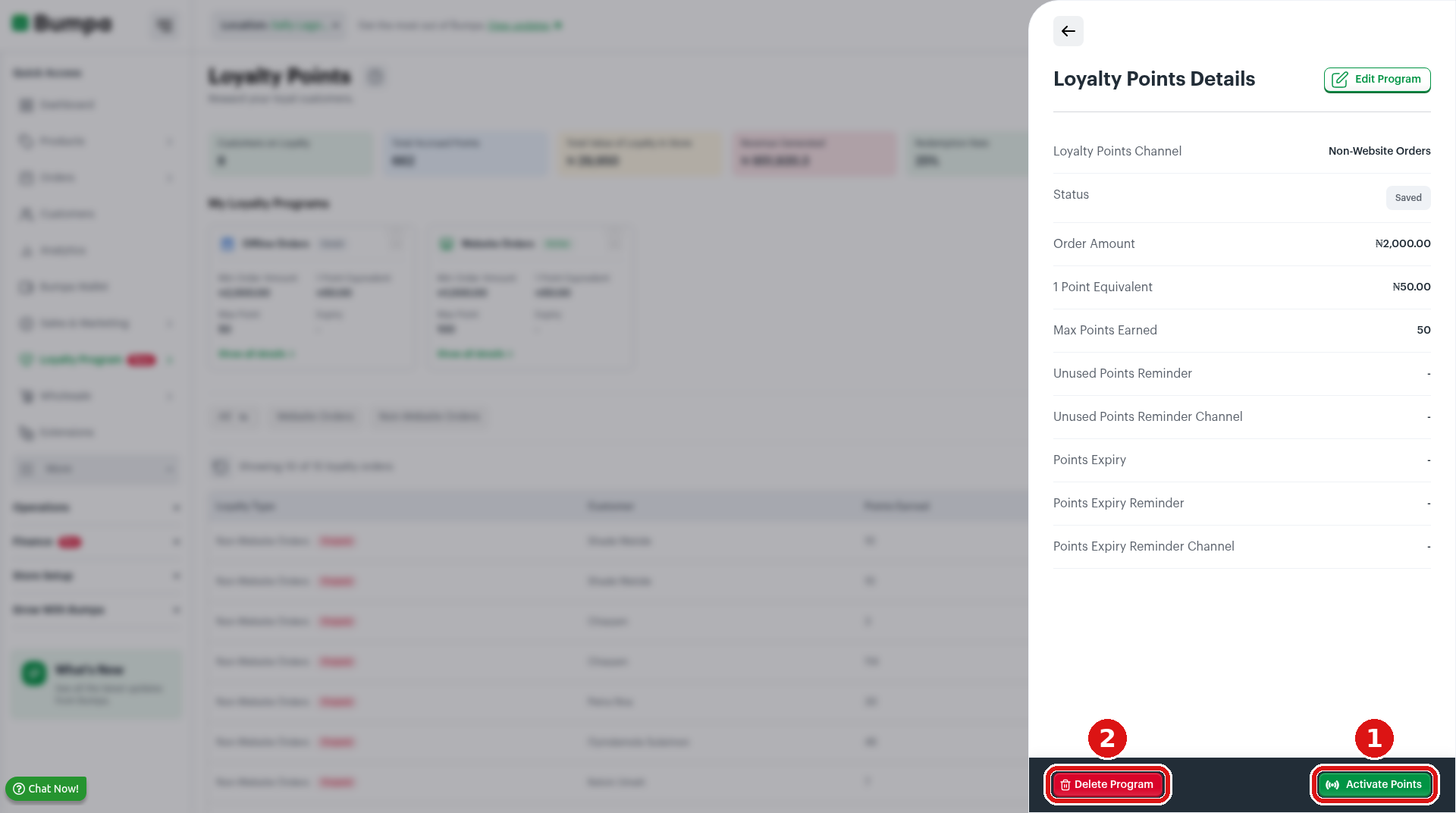
A saved program (status Saved). ① Activate Points to go live · ② Delete Program if you no longer need it.
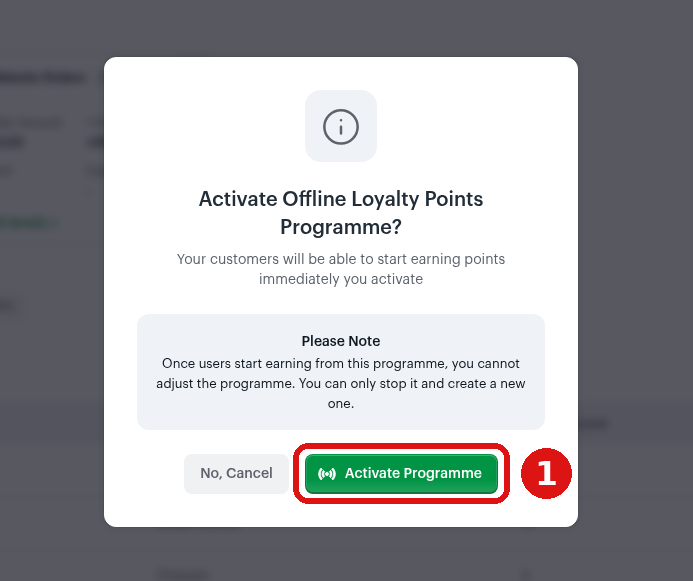
① Click Activate Programme to confirm. Customers start earning straight away.
3. Check Your Program on the Loyalty Points Page
Your program now shows under My Loyalty Programs. Each card shows the channel (Offline Orders or Website Orders), the status (Active or Saved), Min Order Amount, 1 Point Equivalent, Max Points, and Expiry.
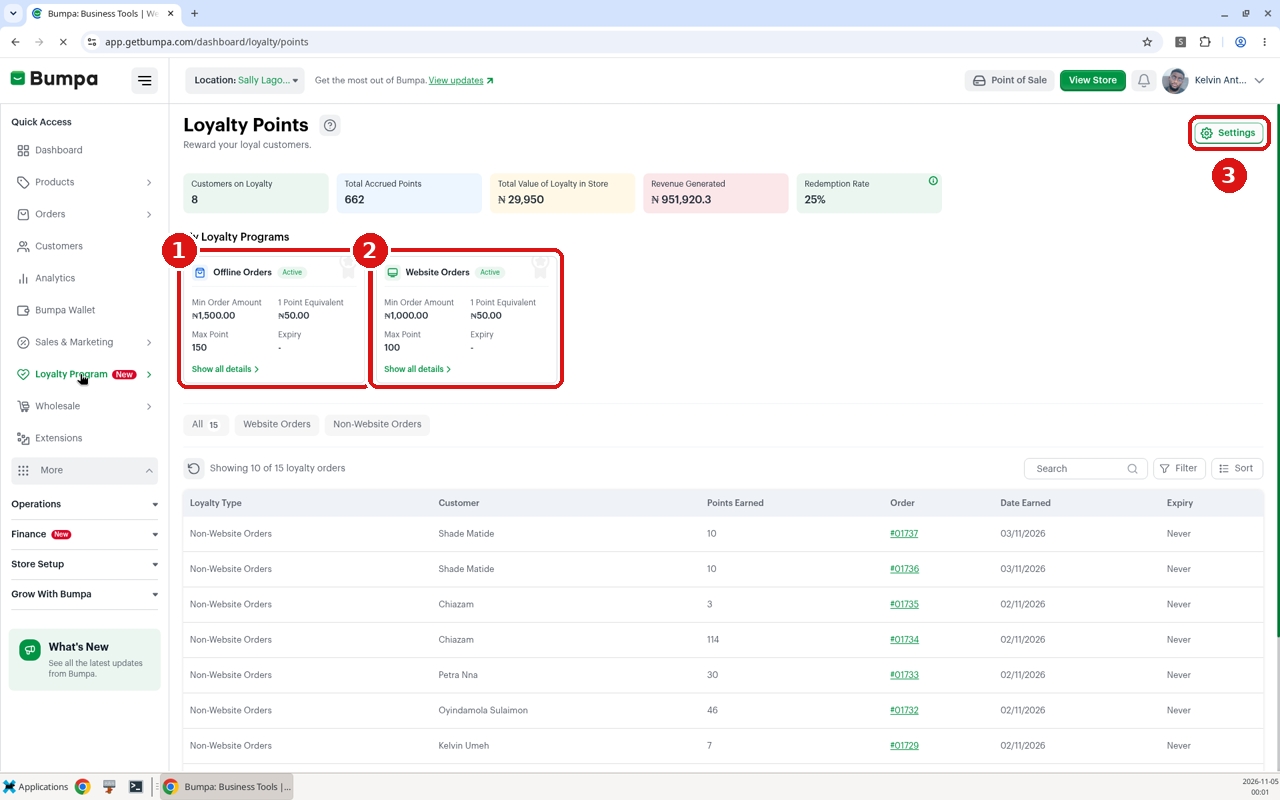
The Loyalty Points page. ① Offline Orders program · ② Website Orders program · ③ Settings (advanced settings, Pro and above).
To see the full details of a program, follow these steps:
Click Show all details on a card.
Loyalty Points Details opens. It shows the channel, status, order amount, 1 point equivalent, max points earned, and your reminder and expiry settings. You can also stop the program from here (see section 7).
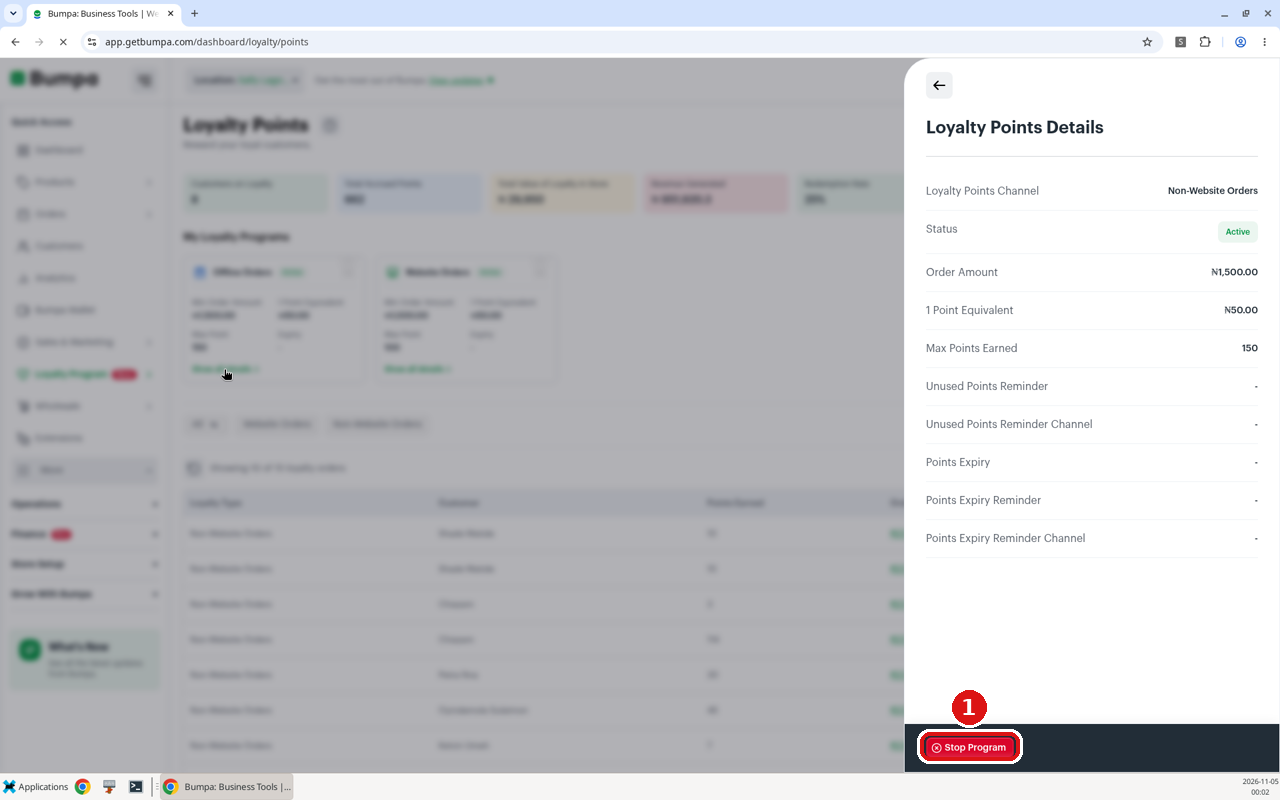
Loyalty Points Details for an active offline program. ① Stop Program is at the bottom.
If you run two programs, the worth of one point is the same on both channels. The spend needed to earn a point can be different.
For example: In our demo store, website orders earn a point for every ₦1,000 and offline orders for every ₦1,500. That gives customers a small push to order on the website.
4. Set Up Advanced Settings (Pro and Above)
Advanced Settings let you rename your points, remind customers about unused points and make points expire. They are available on Pro and above.
To set up Advanced Settings, follow these steps:
On the Loyalty Points page, click Settings at the top right. The Loyalty Advanced Settings page opens.
Custom Points Name: For "Do you want to rename "Points" to something else?", choose Yes, rename, and type a name that fits your brand, for example, "Closet Coins" or "Glow Points". Choose No to keep "Points".
Unused Points Reminder: turn this on to send SMS or email reminders to customers who still have points to spend.
Activate Points Expiration: turn this on to make points expire after the period you choose. You can also send an expiry reminder.
Click Save at the bottom right.
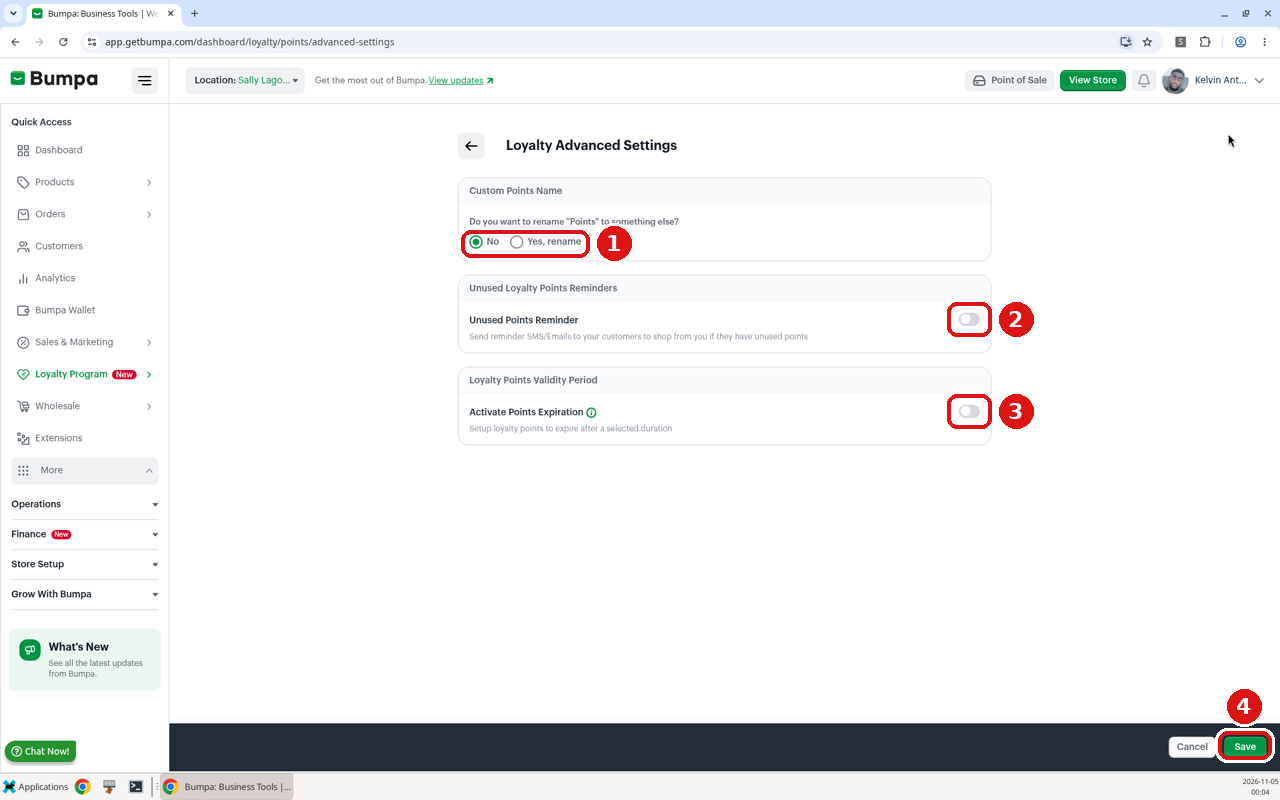
Loyalty Advanced Settings. ① Rename points · ② Unused Points Reminder · ③ Activate Points Expiration · ④ Save.
Reminders cost credits: each email costs 4 credits, and each SMS costs 8 credits.
Points only expire if you turn on Activate Points Expiration. A customer's expiry date starts again each time they place a new order that earns points.
For example: Ameh Accessories sets points to expire one month after the last order and switches on an expiry reminder in early January. Customers who earned points during Detty December get a nudge to come back and spend them.
5. Tell Your Customers
Customers need to know about your points before they can use them. Bumpa shows next steps to help you tell them.
To see the suggestions, click the ? icon next to the Loyalty Points title. You will see:
Set up advanced loyalty settings: expiry dates and reminders for unused points.
Send SMS/Email to inform your customers (this uses Bumpa credits).
Update your website banner/custom message: add your loyalty offer to your website home page.
Create a video showing customers how they earn, and share it on WhatsApp, Telegram, X and Facebook.
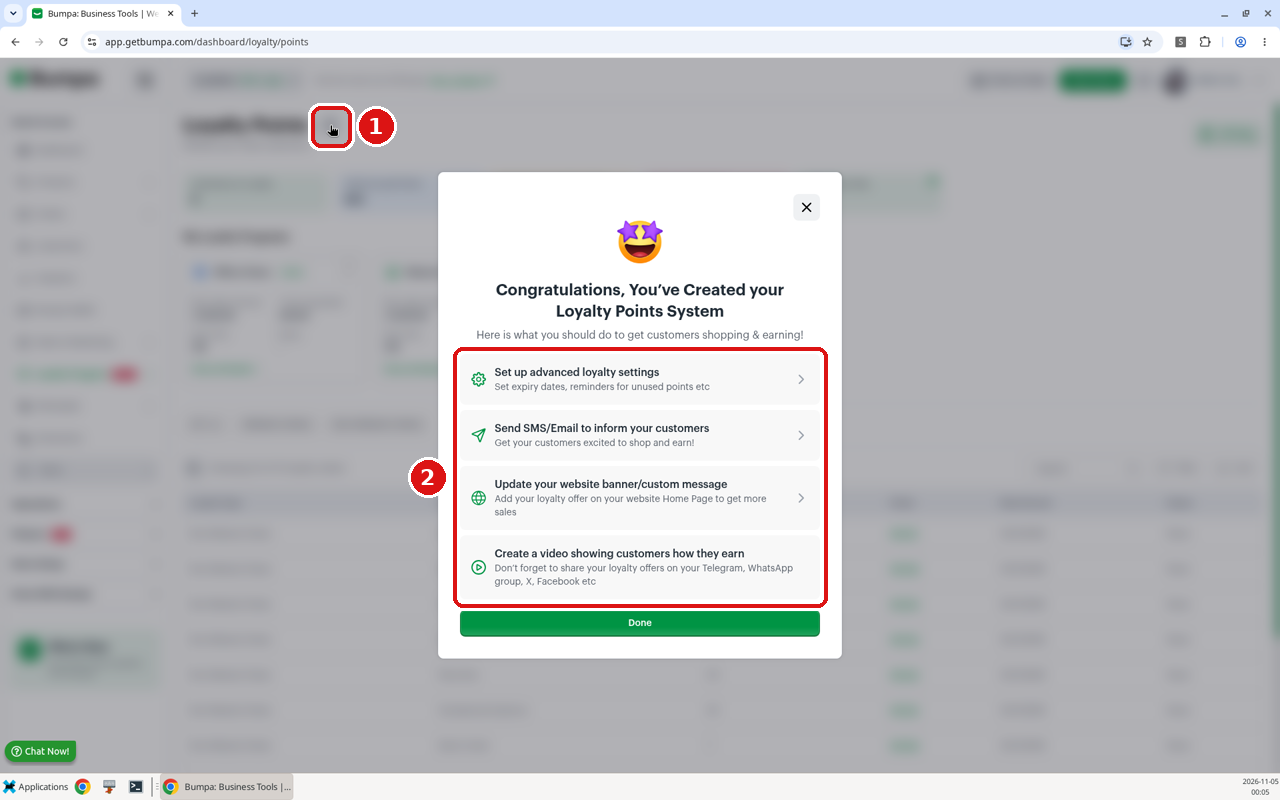
① Click the ? icon · ② Bumpa’s four suggested next steps.
Send a WhatsApp broadcast or post a Status. Here is a message you can copy and change:
“Good news! ? From today, every order from Tola’s Closet earns you loyalty points. For every ₦1,000 you spend, you get 1 point, and each point is worth ₦50 off your next order. Shop on our website or buy in-store, then use your points on payday! ?️”
What customers see on your website. When your website program is active, shoppers see a Great News! pop-up saying they can now earn loyalty points on website orders. At checkout, they are asked to login if they have loyalty points to use.
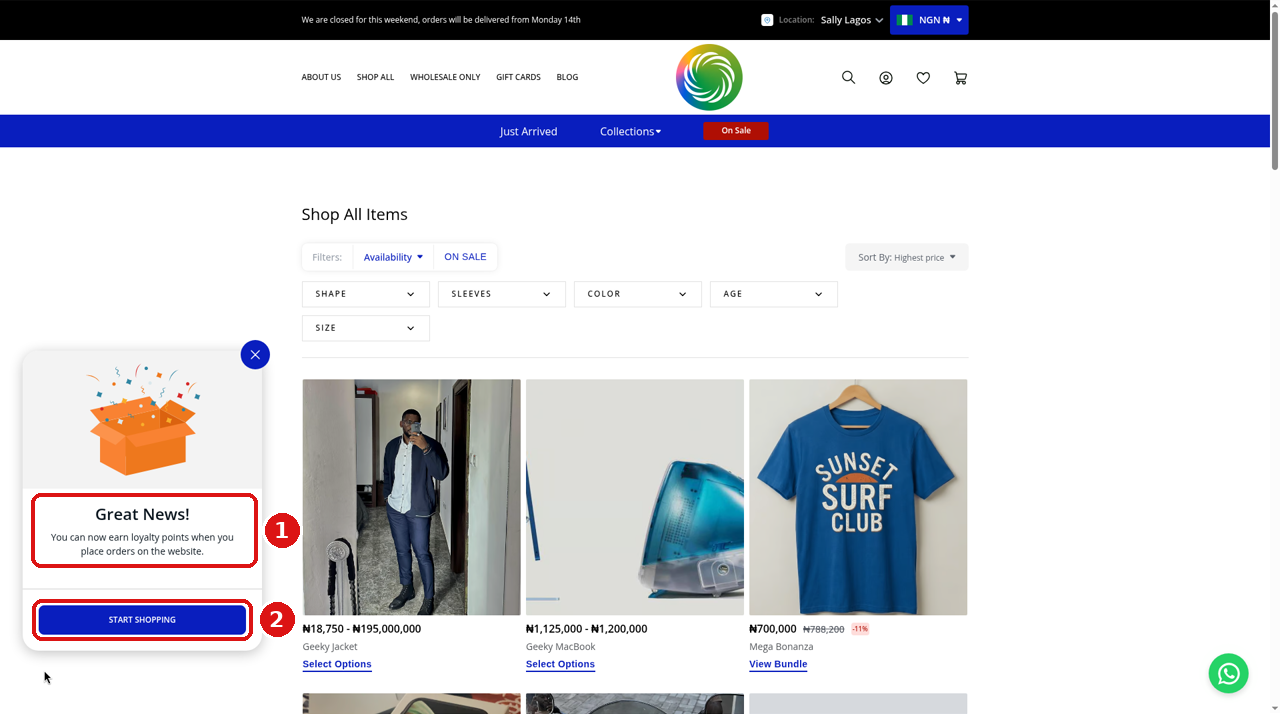
On your website: ① the “Great News! You can now earn loyalty points…” message · ② START SHOPPING.
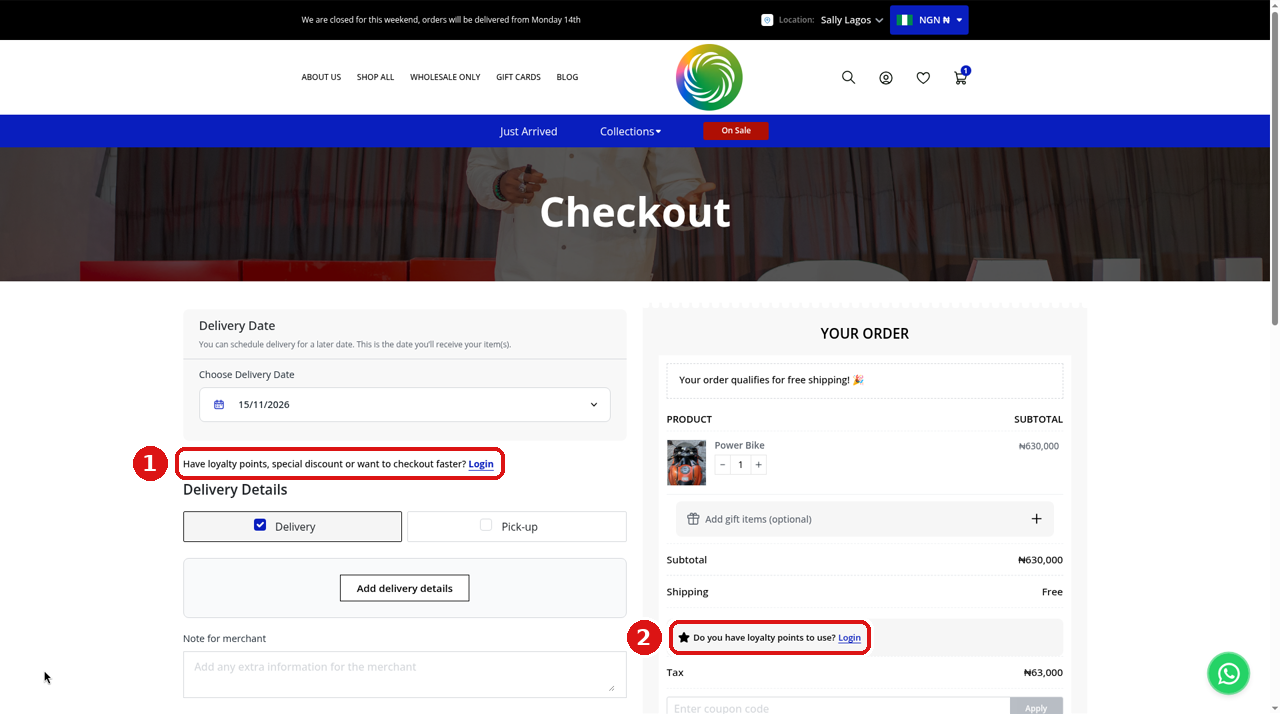
At checkout: ① “Have loyalty points, special discount or want to checkout faster? Login” · ② “Do you have loyalty points to use? Login”.
Rules to share with customers:
Customers need to log in on your website to use their points.
On website orders, at least ₦100 of the order must be paid by cash or card. Points can’t pay for the whole order.
Points and coupon codes can be used together.
Points are only earned on fully paid orders, and they are removed if the order is returned or cancelled.
6. Track Points on Your Orders
Each order shows the points your customer earned on it. You can see your program working.
To check the points on an order, follow these steps:
Click on Orders and open any order.
If the customer earned points on it, you will see a line under Total Amount, for example, "This customer earned 2 loyalty points worth ₦100 on this order".
All orders that earned points also show in the orders table on the Loyalty Points page.
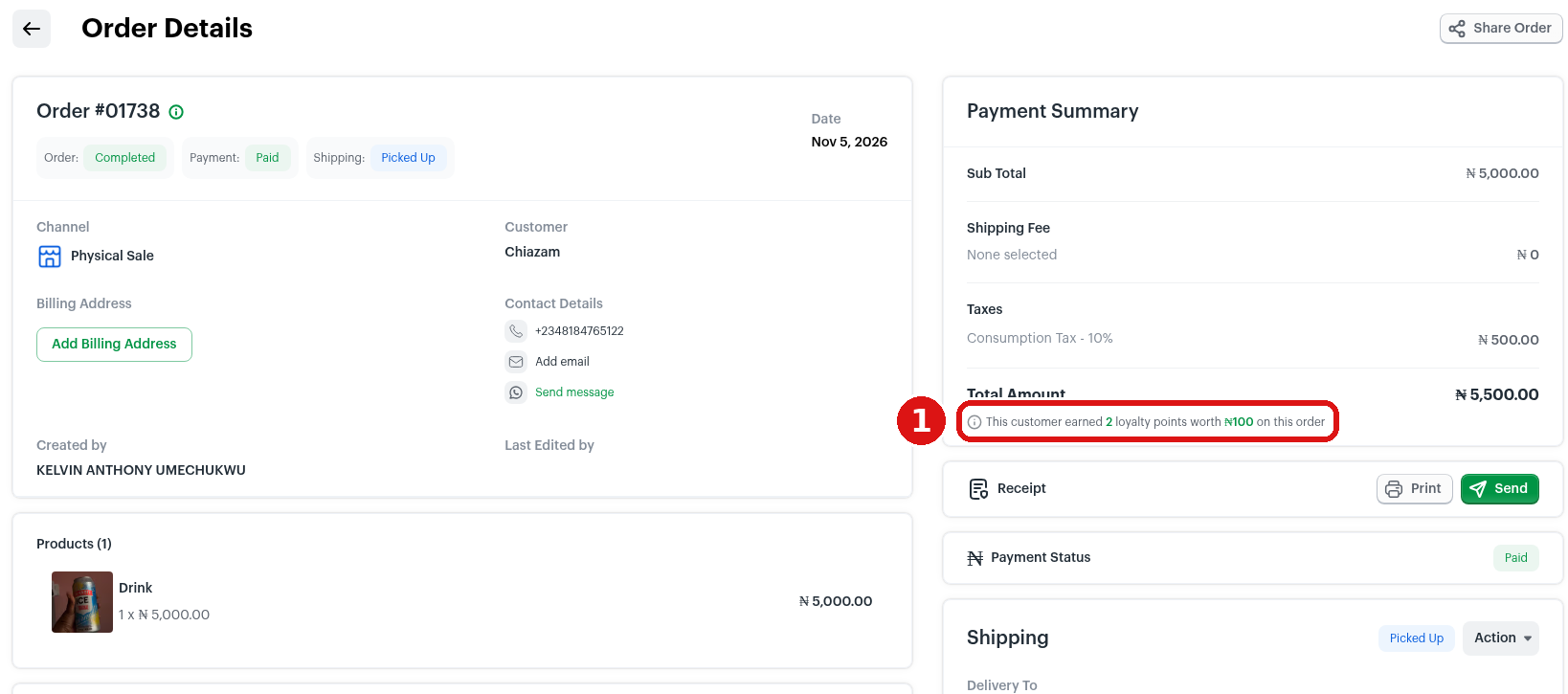
① A fully paid offline TEST order with a customer attached. The line shows the points earned and what they are worth.
Recording a sale in store or on WhatsApp? Always attach the customer to the order when you record it, and mark it as fully paid. If there is no customer on the order, nobody earns the points.
Check the stats at the top of the Loyalty Points page once a week. Watch Customers on Loyalty to see if people are joining, and Revenue Generated to see how much money your program is bringing in.
7. Stopping a program
You can stop a program at any time. Customers stop earning on it. They still get time to use the points they already have.
To stop a program, follow these steps:
On the Loyalty Points page, click Show all details on the program.
Click Stop Program, then confirm with Stop Programme.
Stopping doesn’t switch everything off straight away. Customers stop earning points on that program, and loyalty access ends 30 days later (Bumpa shows you the exact date). Tell your customers to use their points before that date. Once anyone has earned points on a program, you can stop it, but you can’t delete it.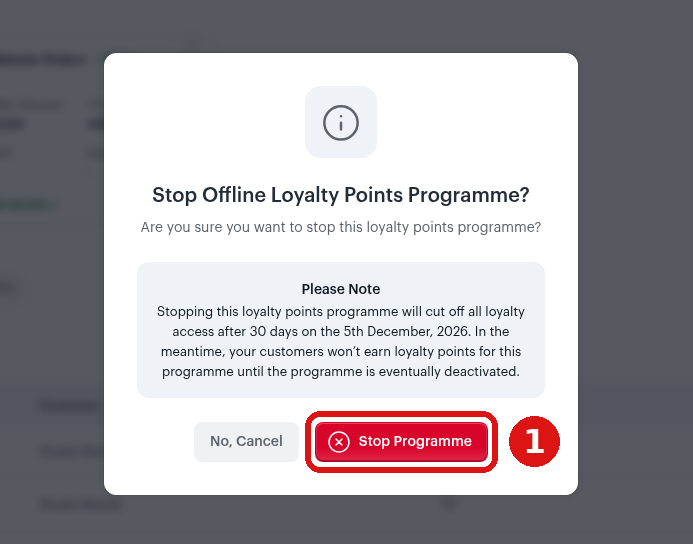
① Stop Programme. The note shows the date loyalty access ends, 30 days from today.
Tips for great results
Start simple. Begin with one channel, usually the one where most of your sales happen. Add the second channel once you are happy with the numbers.
Launch on a strong day: payday Friday, a new-stock drop, or the start of Detty December.
Announce it the same day you activate it, on WhatsApp Status, your broadcast list, and Instagram.
Make the reward feel real. “₦1,000 off your next order” sounds better than “20 points”.
Use expiry with a reminder (Pro and above) to give customers a reason to come back soon.
Give your points your own name, like “Closet Coins”, so customers remember your brand.
Check the Loyalty Points page every week and adjust your marketing based on what you see.
Common mistakes to avoid
Clicking Save and thinking it is live. Save only keeps a draft. Check the status says Active.
Picking a point value you can’t afford. It locks as soon as anyone earns points, so work out your margin first.
Recording offline orders without a customer. No customer on the order means nobody gets the points.
Expecting points on unpaid or part-paid orders. Points come only when the order is fully paid.
Turning on SMS reminders with no credits. Each SMS costs 8 credits and each email costs 4. Top up first.
Stopping a program without telling customers. They have 30 days to use their points. Tell them before the date runs out.
FAQs
Can I edit my program after customers start earning?
No. Once anyone earns points, the program is locked. Stop it and create a new one with your new numbers. You can edit a program while it is still Saved (not active), or while it is active but nobody has earned yet.
Can I change what one point is worth?
Only before any customer has earned points. After that, the worth of one point is locked for your whole store. To change it, stop all your active loyalty programs and set up again.
Can I run programs for website and offline sales at the same time?
Yes. You can have one active program per channel. Both use the same worth of one point, but each can have its own spend per point and limit.
Can customers use points and a coupon together?
Yes.
Do points expire?
Only if you turn on Activate Points Expiration in Advanced Settings (Pro and above). The expiry date starts again each time the customer places a new order that earns points.
Is Loyalty Points on my plan?
Basic Loyalty Points are on all plans. Advanced Settings (rename, reminders, expiry) are on Pro and above.
Why didn’t my customer get points on an offline order?
Check two things: the customer is attached to the order, and the order is marked as fully paid. Also check that your Non-website orders program is Active, not Saved.
What happens if I stop a program?
Customers stop earning on it, and loyalty access ends 30 days later. Tell your customers to use their points before then.
I sell in Kenya. Does this work for me?
Yes. It works the same way, and amounts show in your store’s currency
Related
Was this article helpful?
That’s Great!
Thank you for your feedback
Sorry! We couldn't be helpful
Thank you for your feedback
Feedback sent
We appreciate your effort and will try to fix the article